How to Choose the Best Finger Scan Door Lock
Choosing a Finger Scan Door Lock requires more than comparing prices or choosing the newest design. The reader must work reliably with the people who use it and suit the door where it will be installed. A sensor that responds quickly in a showroom may behave differently with damp fingers, worn fingerprints, or cold hands. Small details matter. Look for clear guidance on enrollment, recognition speed, and how many fingerprints the lock can store. A model that offers multiple attempts can be convenient, but repeated errors may frustrate a household. Fingerprint access is not flawless, and a careful choice should account for that.
Check the lock’s backup options before buying. A keypad, mechanical key, or other approved entry method can help if the sensor fails or its batteries run low. Confirm that the product fits your door’s thickness, handing, and existing hardware, and review the manufacturer’s installation instructions. Also check how the lock handles user data, whether access logs are available, and what warranty and support are provided. Independent reviews can reveal recurring issues, but consider the reviewer’s testing conditions. Not every lock is tested in the same way. The best choice balances dependable access, sensible privacy features, straightforward installation, and a backup plan you understand. A little doubt is useful here: impressive specifications do not guarantee a good fit for your home.
Understand How Fingerprint Door Locks Work
How to Choose the Best Finger Scan Door Lock
Understand How Fingerprint Door Locks Work
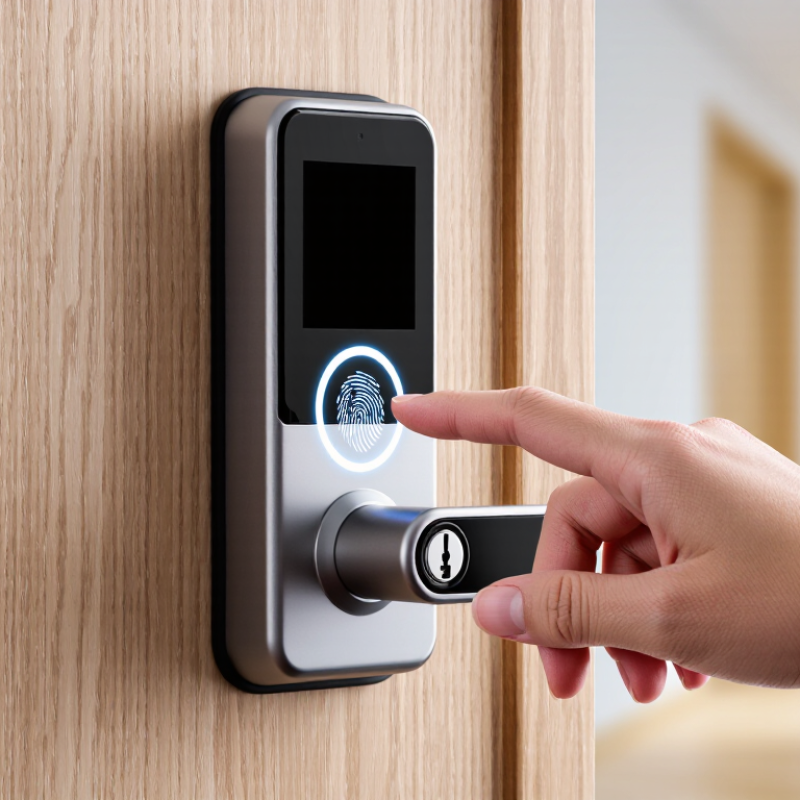
A fingerprint lock starts with enrollment: you place a finger on its sensor several times, often at slightly different angles. The sensor records ridge patterns and converts them into a digital template. Later, it compares a fresh scan with that template and signals the lock’s motor when they match. Many models use capacitive sensors, which detect tiny electrical differences between ridges and valleys. Optical sensors instead capture an image using light. Either way, a smudged, wet, or poorly positioned finger can cause a failed read. Real hands are inconsistent.
Performance numbers need context. NIST’s Digital Identity Guidelines, SP 800-63B, set a false match rate benchmark of 1 in 1,000 or better for biometric comparisons, alongside presentation-attack detection guidance. That is a useful reference, not proof that a consumer door lock meets the standard. Ask whether the maker publishes independent test results, and check how the lock stores fingerprint templates. Local, encrypted storage can reduce exposure compared with sending biometric data to a remote service.
Try the sensor with clean, dry fingers and again after ordinary hand washing. Check whether several household members can enroll fingers comfortably. What happens during a power failure? A backup key or another entry method matters. So does retry handling: repeated scans should not leave you locked out without a practical alternative. “Fast” is not the whole story. A lock’s actual performance depends on its sensor, software, installation, and the condition of your finger.
Assess Your Door, Household, and Access Needs
Before comparing features, inspect the door itself. Check its thickness, material, and existing lock holes, then see whether the door closes smoothly against the frame. A misaligned latch can make even a well-made scan lock frustrating. Small details matter. Dampness, dust, or a rough surface near the lock may also affect installation or everyday use. Compare the lock’s fitting requirements with your door measurements, and do not assume every model works with every door.
Think about who will use the lock each day. A household with children, older adults, or frequent visitors may need more than fingerprint access. Some people find scanning difficult when their fingers are wet, cold, or worn; a keypad or physical key can provide a useful backup. Enroll more than one finger per regular user, and test access at a relaxed pace before relying on it. On paper, one scan seems simple. Real routines are messier.
Your access habits should guide the remaining choices. If a cleaner or caregiver visits at set times, temporary codes may be more practical than adding another fingerprint. If you often arrive carrying bags, check how easily the sensor can be reached and whether the lock gives clear feedback. Battery alerts and a dependable backup method deserve attention, too. Connected features can be convenient, but they may add setup and maintenance you do not need. Consider what you would do if the batteries ran low on a rainy evening.
Compare Fingerprint Sensors and Security Features
A fingerprint sensor should work quickly without demanding a perfect finger. Capacitive sensors read tiny differences in skin ridges, while optical sensors capture an image of the print. Some locks use ultrasonic sensing to map ridge details beneath the surface. Performance varies, so test the sensor with clean, dry fingers and slightly damp ones. That matters. Cold hands, worn fingerprints, and hurried touches can cause failed reads, even with a capable sensor. A lock that allows several enrolled fingers can make daily access easier, but avoid enrolling the same finger repeatedly as a substitute for a backup method.
Look beyond the sensor. Check whether fingerprint data stays encrypted and stored locally, rather than being sent to an outside service. Not always. Read the privacy details. A PIN keypad offers a practical fallback, while temporary codes can help when a guest needs access. Auto-lock settings, tamper alerts, and a clear record of entries add useful layers, but none replaces a strong door and properly fitted strike plate. Check how the lock behaves when its batteries run low: a visible warning and an accessible backup power option can prevent a frustrating lockout. Test it. A few minutes with the settings can reveal whether alerts are clear and whether the backup entry method is genuinely usable.
Check Installation, Power, and Backup Entry Options
A finger scan door lock should fit the door you have, not just look suitable online. Measure door thickness and the distance from the edge to the lock bore before ordering. Check whether the door opens inward or outward and whether the deadbolt lines up cleanly with the strike plate. If the bolt scrapes or needs a hard push, the lock may misread the door’s position or fail to latch reliably. A neat fit matters.
Power deserves the same attention. Check the required battery type, how to replace it, and whether the lock gives a low-battery warning. Battery life varies with use, temperature, and settings, so treat advertised estimates as a guide. Make sure you can reach the battery compartment from indoors without special tools. If the model offers emergency power from outside, confirm the method and required accessory before you need it. Test it.
Plan a backup entry method before installation. Depending on the lock, that may be a keypad, a mechanical key, or another approved access option. Keep any spare key somewhere secure and accessible, not under a mat beside the door. Test the backup while the door is open, then again with it closed. Finger scans can be less dependable with wet, cold, or worn fingers; a backup is not just an extra feature. It is easy to overlook until the batteries run low or your hands are full.
Evaluate Reliability, Privacy, and Long-Term Costs
A finger-scan lock is only useful when it reads your finger consistently. Check how it performs with dry skin, slightly damp hands, and different fingers, since winter dryness or a small cut can affect recognition. Try the sensor several times before buying, and check whether the lock gives clear feedback after a failed scan. A dependable backup matters. Make sure a keypad or physical key works when batteries run low or your finger is not recognized. Test that backup, too.
Privacy depends on how the lock handles biometric data. Look for plain explanations of whether scans stay on the device or are sent to an online service, and how stored data is protected and deleted. If those details are vague, pause. A fingerprint cannot be changed like a password. Also consider who can add users and whether the lock records entry times; convenient logs can reveal household routines. Long-term costs include replacement batteries, app subscriptions, maintenance, and possible repairs. Compare these over several years, not just the purchase price. I may give too much weight to easy setup; a lock that is simple on day one can become frustrating if updates or support stop. Check the warranty and support terms before deciding.